.png)
Understanding Rate Comparison
Shipping
Understanding Your Rate and Cost Breakdown
Every time you create a shipment, Shippiz shows you every carrier rate side by side, with a full cost breakdown, so you can see exactly where you're saving.
Quick summary: On the rate selection screen, Shippiz compares every connected carrier in real time and breaks each rate down into base shipping cost, surcharges, and your savings vs. retail - so the cheapest label is always obvious, and selected automatically.
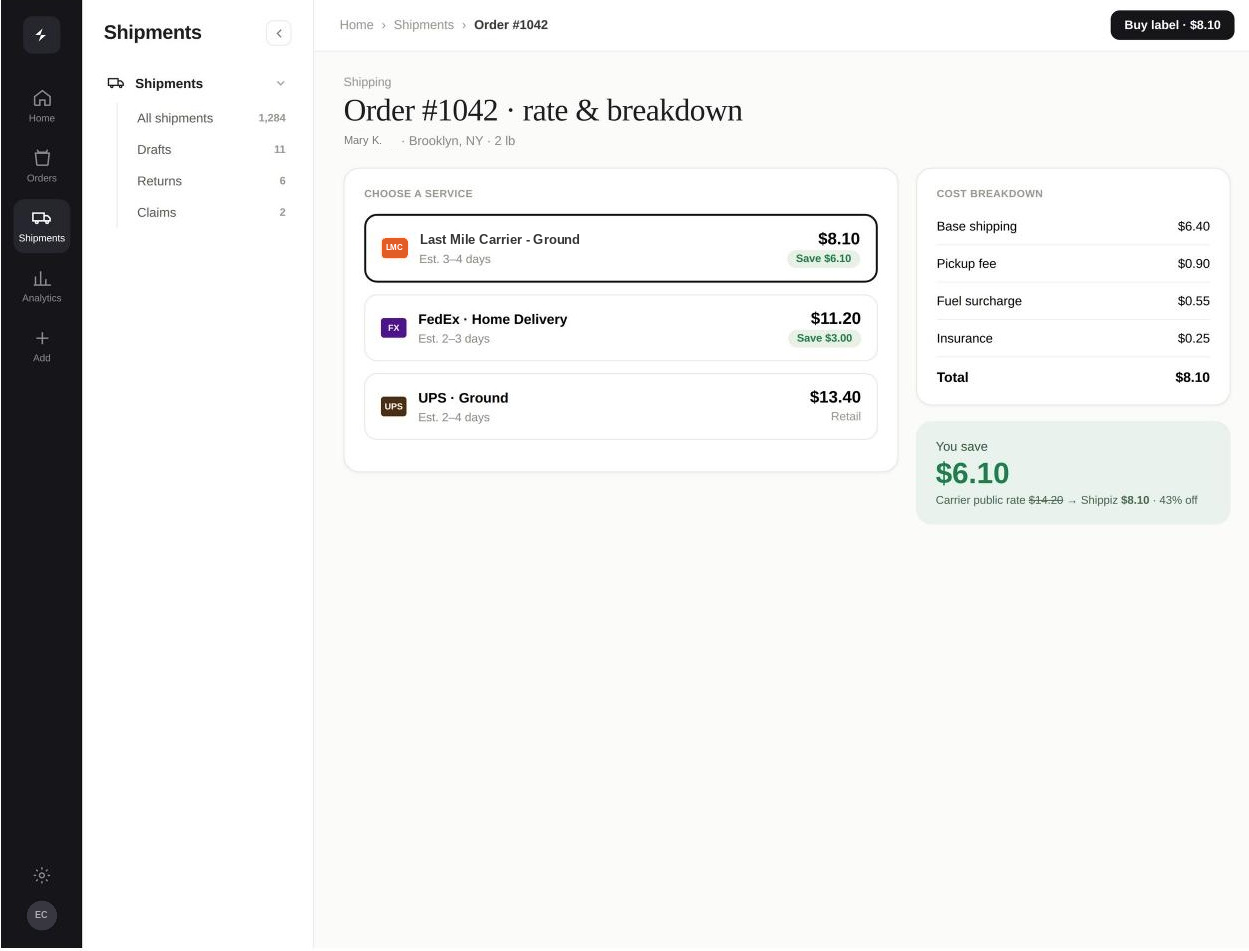
See exactly where you're saving on every single shipment.
What's included in the breakdown
- Base shipping cost - the core carrier rate for the service level selected.
- Surcharges - any additional carrier fees (fuel, residential, etc.) itemized separately so nothing is hidden in one lump sum.
- Savings vs. retail - exactly how much less you're paying compared to the carrier's standard published rate.
- Total cost - the final amount that will be deducted from your wallet if you select that rate.
How the cheapest rate gets picked
Shippiz rate-shops your shipment across every carrier connected to your account - including any of your own negotiated accounts - the moment you enter your package details. The lowest total cost is highlighted and selected by default, but you can always review the full list and manually choose a different carrier or service level if you prefer.
Tip: Connect your own carrier accounts under Settings → Shipping Setup so Shippiz can compare your negotiated rates against ours too - you'll always get whichever is cheaper.